Remove the pickup roller and pickup pad
author: chameleon
2024-07-31
Heguang has an experienced technical maintenance service team that can assist customers in solving machine problems.
How to remove the pickup roller and stripper pad of the Riso ComColor printer?
1. Remove the plastic buckle and copper ring next to the pickup roller to remove the first pickup roller.

2. Remove the auxiliary rod of the second pickup roller first, then remove the other auxiliary accessories in order to take out the pickup roller.
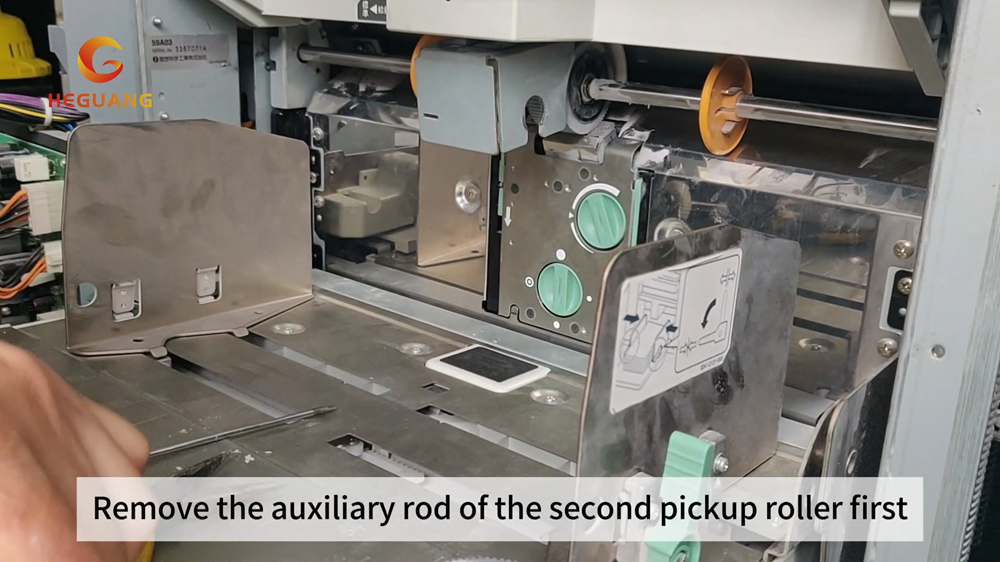
3. Press the buckle, take out the standard paper tray pickup base, remove the stripper pad base, remove the aluminum sheet along the card slot, and then you can take out the stripper pad.

For detailed operation video, please click the link below to view it. Remove the pickup roller and pickup pad
About Heguang
Guangzhou Heguang Delicate Chemical Co., Ltd is headquartered in the strategic center area of eastern Guangdong, China. It is based on the forefront of the development of fine chemicals. It is an enterprise that relies on national laboratories and integrates research, industry and trade. Heguang Company has independent innovation and independent intellectual property rights, and its product quality has always maintained a leading level in the field of high-speed inkjet printers. We are committed to providing environmentally friendly, high-quality inks that do not clog the inkjet heads for the majority of inkjet printer users, as well as providing customers with one-stop solutions. We also have resource advantages in parts supply and technical support, making your business operations more convenient.
For more information about Heguang, please visit www.inkchameleon.com.
You can also connect with Heguang Facebook (Chameleon comcolor ink),
Instagram (heguang_inkjet_ink), and YouTube (Chameleon ComColor ink).
You can also connect with Heguang Facebook (Chameleon comcolor ink),
Instagram (heguang_inkjet_ink), and YouTube (Chameleon ComColor ink).
How to remove the waste ink tank of the Riso ComColor printer?
Gap Adjust Set Tutorial for Replacing Riso Comcolor Printers
Related Article
2026 1 Prepare materials and check the machine 2 Identify the correct ink color and cartridge type 3 Open the front cover and remove the cartridge 4 Remove the empty cartridge
Steps for Using RISO Ink: A Detailed Step-by-Step Guide

Discover the riso printing working principle, a unique stencil-based digital printing method creating bold, textured prints. Explore risograph ink, layered color effects, and the process behind dynamic and economical riso prints.
Understanding Riso Printing: Working Principle & Process