What Is Risograph?
What Is Risograph?
Updated October 7, 2026
Risograph — often shortened to "Riso" — is a stencil-based digital duplicating technology that sits somewhere between screen printing and a traditional photocopier. It's prized by artists, zine-makers, and print shops for its distinctive grainy texture, low cost per print, and vivid spot-color inks — but it also comes with real limitations around precision and color blending that beginners often underestimate.
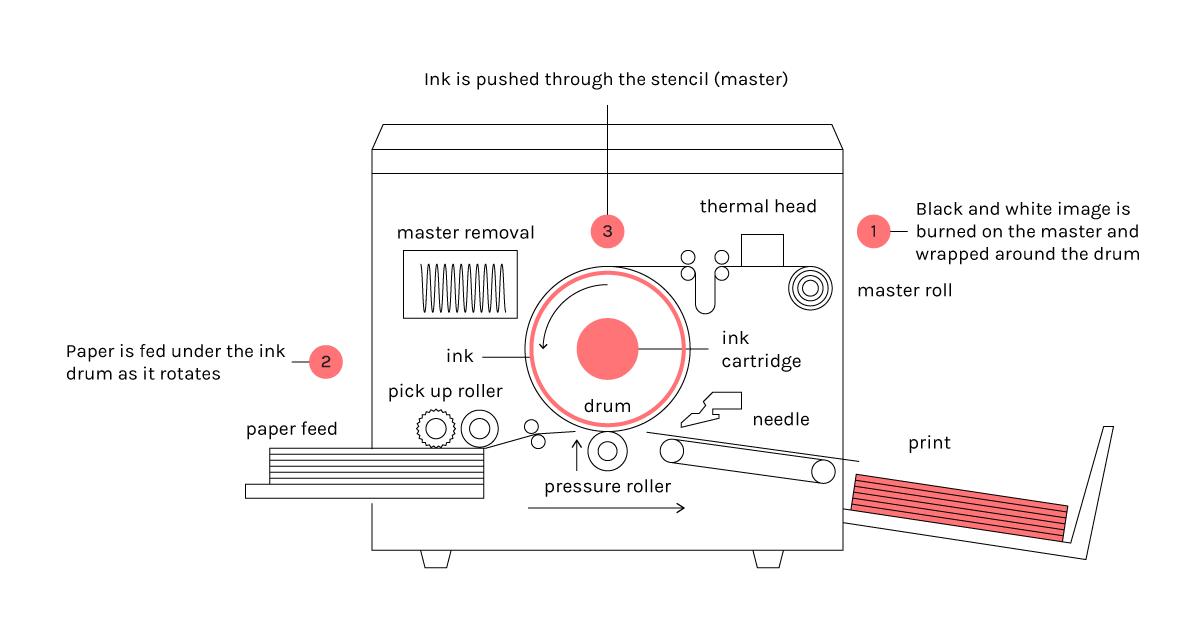
In plain terms: a Risograph is a machine that burns a master stencil of your image, wraps that stencil around a rotating drum filled with one color of ink, and pushes ink through the stencil onto paper — one color, one pass, at a time. The result is a print with a soft, slightly textured look, often compared to screen printing, but produced faster and at a much lower cost per sheet.
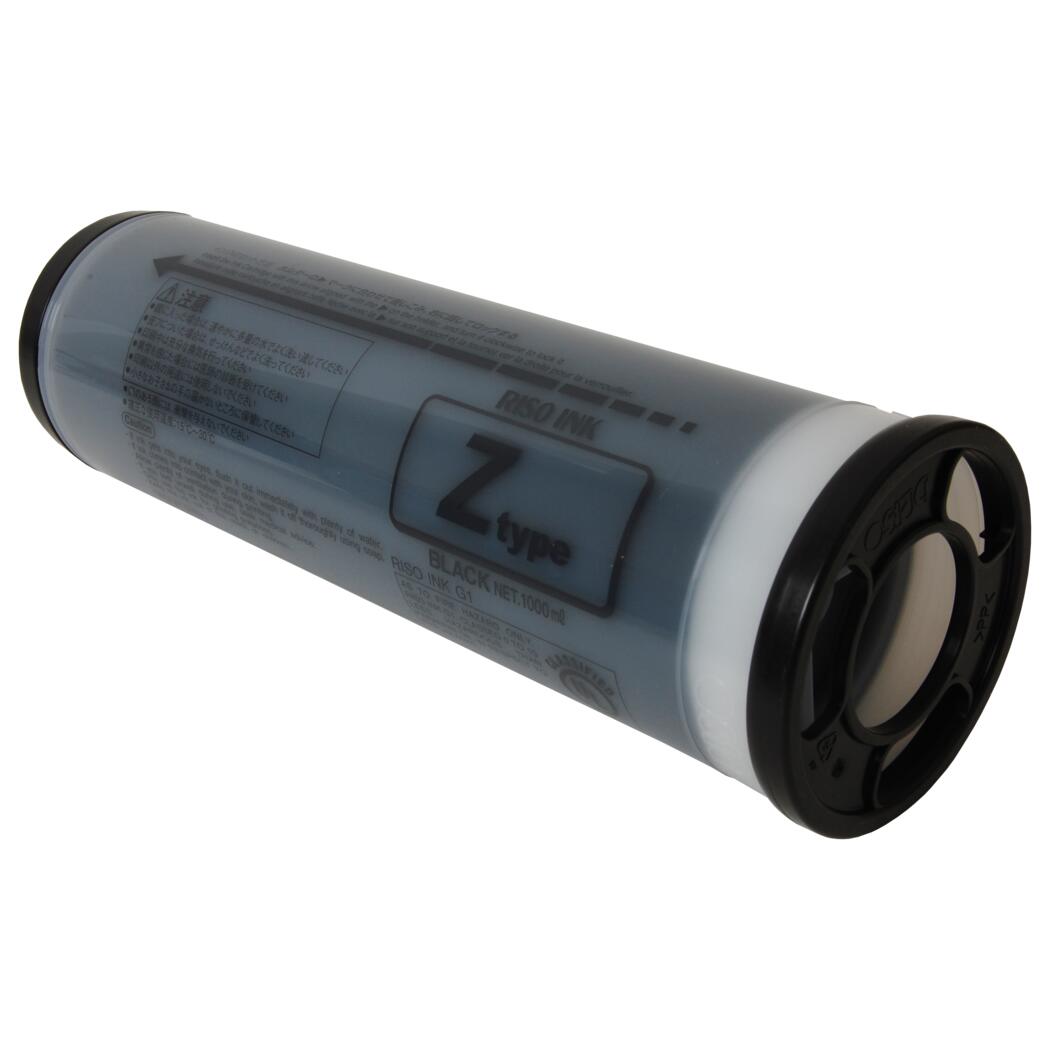
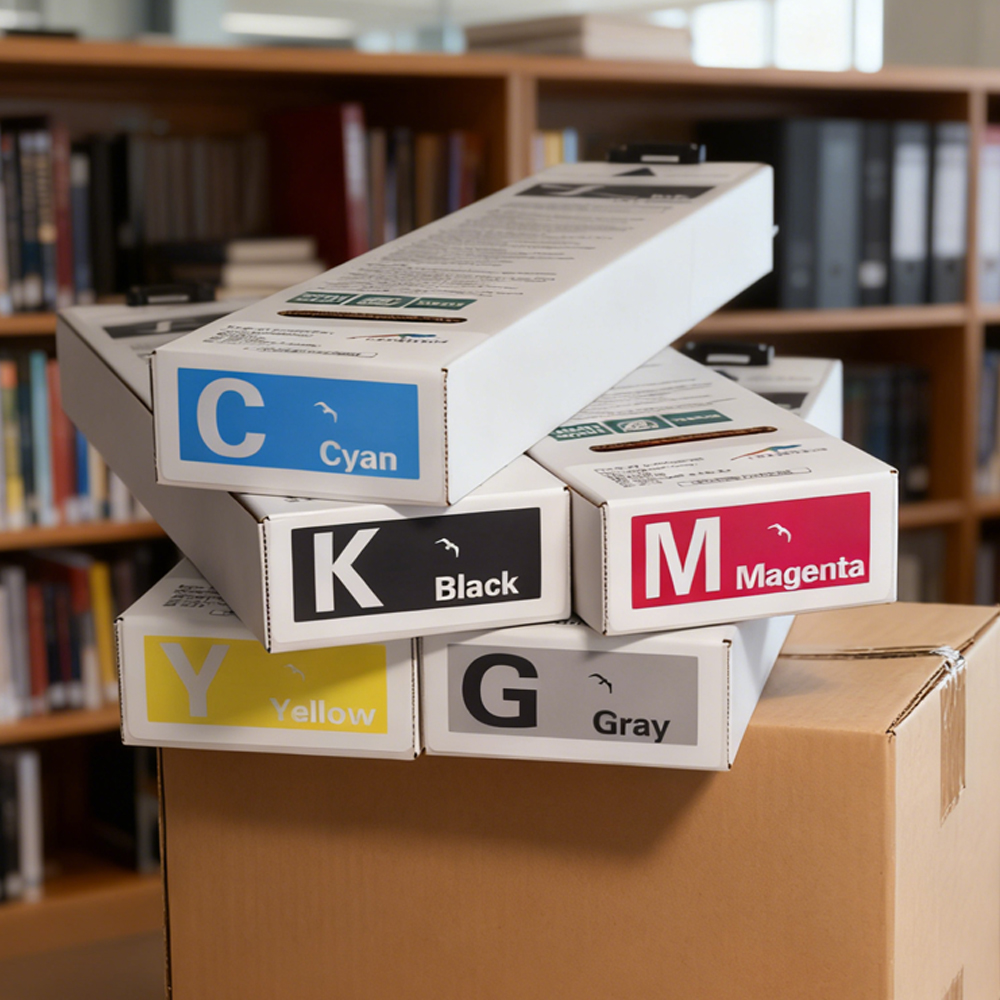
Risograph machines were originally built by the Japanese company RISO KAGAKU CORPORATION for high-volume office duplication — think school newsletters, church bulletins, and internal memos. Over the past two decades, the same machines have been adopted by independent publishers, illustrators, and designers for their unmistakable print aesthetic. If you're sourcing ink or replacement cartridges for a Risograph or ComColor machine, our guide to Riso ink colors, types, and differences breaks down what each ink type actually does and how the spot-color system works.
This guide walks through how Risograph actually works, how it compares to other printing methods, what it's commonly used for, and how to get started — whether you're commissioning your first print run or sourcing ink for a machine you already own.
A Brief History of Risograph
Risograph traces its roots back to the mimeograph — a stencil duplicating technology popular throughout the 20th century for cheap, high-volume document printing. RISO KAGAKU CORPORATION, founded in Tokyo in 1946, modernized this concept in the late 1980s by combining stencil duplication with digital scanning and printing controls, launching the first "RISOGRAPH" machines in 1986.
For most of its history, Risograph was strictly a practical office tool. Schools, nonprofits, and religious organizations used it to print large batches of documents at a fraction of the cost of offset printing or laser toner. Outside Japan, the machines were often sold under a different brand name — RISO's duplicators are marketed internationally as "ComColor" or "Risograph," depending on the model generation and region.
The creative community discovered Risograph almost by accident. In the 2000s and 2010s, designers and independent publishers — particularly in the zine and small-press scenes — found that the machine's imperfect registration, soft texture, and fluorescent spot-color inks produced a print quality that digital printing simply couldn't replicate. What was once office equipment became a sought-after creative medium, and Riso print studios began popping up specifically to serve artists rather than offices.
How Does a Risograph Machine Work?
Understanding how a Risograph physically produces a print makes everything else about the medium — its colors, its limitations, its texture — much easier to understand.
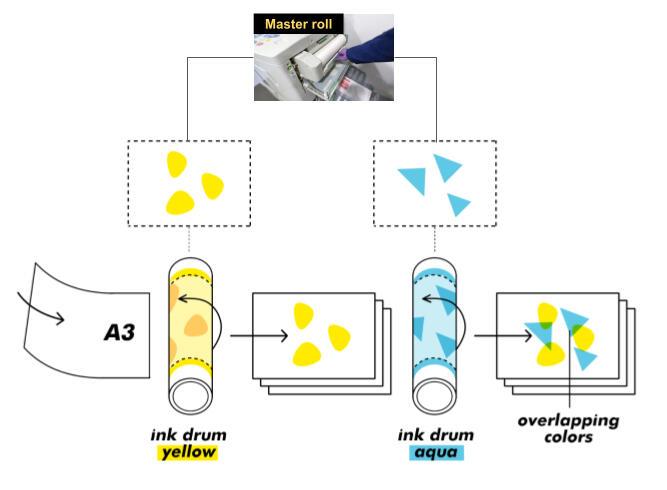
Step 1: Master-making. You send a digital file (or scan a physical image) to the machine. Instead of printing directly, the Risograph uses a thermal print head to burn thousands of tiny holes into a sheet of master film — essentially creating a stencil of your image.
Step 2: Drum wrapping. That master stencil wraps around a cylindrical drum. Each drum is filled with exactly one color of ink — this is the single most important thing to understand about Risograph, because it means one drum equals one color. A Risograph machine typically has one or two drum bays installed at a time, so if you want more than one or two colors, you need multiple passes with different drums.
Step 3: Printing. As the drum rotates and paper feeds through, ink is pushed from inside the drum, through the perforated stencil, directly onto the paper. There's no heat, no toner fusing, and no liquid-ink drying time in the way inkjet printers require — the ink is oil- or soy-based and dries largely by absorption into the paper.
Step 4: Repeat for each color. If your design uses two, three, or four colors, the paper is run back through the machine once per color, with a different drum (or a drum swap) each time. Because each pass is a separate physical print, slight shifts in paper alignment between passes create the soft, occasionally imperfect registration that's become part of Risograph's visual signature.
This drum-and-stencil system is also why Risograph is sometimes called a "digital duplicator" rather than a "printer" — it's digitally controlled, but mechanically, it's closer to a high-speed stencil press.
Risograph vs. Other Printing Methods
Risograph occupies a strange middle ground between several more familiar printing technologies, and understanding where it sits helps clarify both its strengths and its limits.
Risograph vs. Screen Printing. Both use a stencil to push ink through onto a substrate, and both produce vivid, slightly textured spot-color prints. But screen printing is manual, labor-intensive, and better suited to short runs on varied surfaces (fabric, wood, unusual paper stock). Risograph is machine-automated, faster for paper-based runs of 50–2,000 copies, and far cheaper per unit at that volume — but it's limited to paper and can't match screen printing's surface versatility.
Risograph vs. Offset Printing. Offset is the industry standard for high-volume, color-accurate commercial printing — think magazines, packaging, and books. It delivers precise CMYK color blending and perfect registration, but it only becomes cost-effective at very high volumes (often 1,000+ copies) due to plate setup costs. Risograph has no comparable setup cost, making it dramatically cheaper for short runs, but it can't match offset's color precision.
Risograph vs. Digital Inkjet/Laser Printing. Standard digital printers (inkjet or laser) offer the most flexibility — print one copy or print a thousand, full photographic color, no drums or stencils required. What they can't offer is Risograph's physical ink texture, its fluorescent spot-color range, or its signature "handmade" look. Digital printing is also typically more expensive per page at volume, since there's no equivalent to Risograph's bulk-ink-tank economics.
In short: Risograph wins on cost-per-copy at mid-size runs and on aesthetic character; it loses on color precision, registration accuracy, and single-copy flexibility.
The Risograph Color System
Risograph doesn't use CMYK process color the way most printers do. Instead, each drum holds a single, pre-mixed spot color — a defined pigment ink rather than a blend created on the fly. RISO offers a standard palette of more than a dozen spot colors (including some less common ones, like metallic gold, metallic silver, and several fluorescent tones), and each color is tied to a specific ink formulation and part number.
Because each color requires its own drum pass, multi-color Risograph prints are built up in layers — and where two transparent inks overlap, they blend optically on the page, creating a third color that exists only where the layers intersect. A layer of blue over a layer of yellow, for example, produces green in the overlap area, while the non-overlapping regions stay pure blue or pure yellow. This layering behavior is one of the defining creative tools of the medium — designers often plan artwork specifically around which colors will overlap and what new color that overlap will produce.
Most Riso inks are semi-transparent, which is part of what makes this layering effect possible — it's also why solid black tends to be the most commonly stocked drum color, since it's opaque enough to sit on top of other colors without excessive blending. If you're trying to understand which ink types exist, how colors are coded, and which cartridges fit which machines, our breakdown of Riso ink colors, types, and differences covers the full color system in more depth, including how compatible and OEM ink options compare.
What Can You Print with a Risograph?
Risograph's cost structure and visual character make it particularly well suited to certain kinds of printed material, even though technically it can print almost any flat paper document.
- Zines and independent publications — the most iconic use case; Risograph's low per-copy cost makes short-run self-publishing financially viable in a way offset printing isn't.
- Art prints and limited-edition posters — the layered spot-color look has become a recognizable aesthetic in illustration and gallery print culture.
- Flyers, event posters, and promotional materials — especially for independent venues, record labels, and creative studios that want a distinctive look on a limited budget.
- Greeting cards, zines, and stationery products — small creative businesses often use Risograph for product lines where texture and color vibrancy matter more than photographic precision.
- Office and institutional documents — the original use case still holds: newsletters, bulletins, worksheets, and internal paperwork printed in bulk at low cost.
What Risograph is generally not well suited for is detailed photographic reproduction, precise full-color branding work, or any job requiring exact, repeatable color matching — the medium's charm comes from the same imprecision that makes it unreliable for those use cases.
Who Uses Risograph Printing?
Risograph's user base splits fairly cleanly into two groups with very different needs.
Creative users — illustrators, independent publishers, art students, design studios, and record labels — are typically drawn to Risograph for its visual character rather than its cost savings alone. Many don't own a machine themselves; they commission prints through dedicated Riso print studios, which have grown into a small but active global industry over the past decade.
Institutional users — schools, churches, nonprofits, and small offices — use Risograph largely for its original purpose: printing large volumes of black-and-white or two-color documents far more cheaply than laser printing allows. These users are less concerned with the aesthetic and more focused on cost-per-page at scale, often running tens of thousands of pages per month through a single machine.
A smaller but growing third group — small print shops and makerspaces — straddle both worlds, offering Riso printing as a paid service to the creative community while also using the machines for their own institutional or commercial printing needs.
Advantages and Limitations of Risograph
Like any printing method, Risograph makes sense for some jobs and not others. Weighing the trade-offs honestly is the best way to decide if it fits your project.
Advantages:
- Low cost per copy at mid-size runs — once a master is burned, printing additional copies costs very little, making 100–1,000 copy runs far cheaper than offset or digital alternatives.
- Distinctive visual texture — the slight grain, soft registration shifts, and vivid spot-color inks create a look that's difficult to replicate digitally.
- Fast turnaround — Risograph machines print considerably faster than most digital printers once a master is set, often exceeding 100 pages per minute for single-color runs.
- Lower environmental impact per copy — Riso ink is largely soy- or rice-oil based rather than petroleum-based, and the process uses no heat fusing, which reduces energy consumption compared to laser printing.
Limitations:
- No true full-color photography — because color is built from a limited set of spot inks rather than CMYK blending, Risograph struggles to reproduce photographic images with full tonal accuracy.
- Registration isn't perfectly precise — multi-pass printing means slight misalignment between color layers is normal, which can be a feature for art prints but a problem for brand-accurate work.
- Not economical for very short runs — a single copy or a run of five isn't cost-effective, since the master-burning step adds fixed overhead regardless of quantity.
- Limited substrate flexibility — Risograph is built for paper; it doesn't print on fabric, wood, or other non-paper surfaces the way screen printing can.
Risograph Prints: What Makes Them Unique
When people search specifically for "Risograph prints" rather than the printing process itself, they're usually referring to the finished output — posters, zine pages, or art editions — and what makes that output visually distinct from anything produced digitally.
The defining characteristics come directly from the mechanics covered earlier in this guide. Because ink is pushed through a stencil rather than sprayed or fused, Risograph prints have a tactile, slightly raised texture you can often feel by running a finger across the page. Because colors are layered in separate passes rather than blended by a printer head, overlapping areas develop a visible depth and occasional soft misregistration that reads as handmade rather than mass-produced. And because the ink palette is built from vivid, semi-transparent spot colors rather than standard CMYK, Risograph prints tend to have a saturation and warmth that's difficult to match with digital reproduction — fluorescent pinks, oranges, and blues in particular have become closely associated with the medium's visual identity.
This combination — texture, layered color, and a palette that doesn't exist in standard digital printing — is why Risograph prints are frequently collected and sold as limited-edition art objects, not just functional printed matter.
Getting Started with Risograph Printing
There are two realistic paths into Risograph printing, and which one makes sense depends on how often you plan to use it.
Commissioning prints through a Riso studio. For most individual artists, designers, and small publishers, this is the simpler and lower-risk starting point. You supply print-ready files (typically separated by color layer), and the studio handles master-making, drum selection, and the printing itself. This avoids the upfront cost of a machine while still giving you access to the full creative color-layering process.
Owning and operating a machine. For print shops, studios, or institutions running regular high-volume jobs, owning a Risograph (or compatible ComColor) machine becomes cost-effective over time. This path comes with ongoing responsibilities — ink and master-roll sourcing, drum maintenance, and troubleshooting mechanical issues as the machine ages. If you're setting up or maintaining a ComColor-series machine specifically, our ComColor printer setup and ink cartridge repair guide walks through common setup steps and cartridge-related troubleshooting for machine owners.
Whichever path you choose, it's worth starting with a small test run before committing to a full print job — color layering behaves differently on different paper stocks, and seeing a physical proof is the only reliable way to confirm your design will overlap and register the way you expect.
FAQ
Is Risograph the same as screen printing?
No. Both use a stencil-and-ink process, but screen printing is a manual craft technique suited to varied surfaces, while Risograph is a machine-automated process limited to paper, optimized for speed and cost at mid-size print runs.
How many colors can a Risograph print?
Technically unlimited, since you can run paper through multiple times with different drums — but practically, most Risograph jobs use two to four colors, since each additional color adds a full printing pass and increases registration risk.
Is Risograph printing expensive?
It depends on volume. For runs under roughly 50 copies, Risograph isn't particularly cost-effective due to the fixed cost of master-making. For runs in the hundreds to low thousands, it's typically far cheaper than offset or digital alternatives.
Can Risograph print photographs?
It can approximate photographic images using halftone techniques, but because color is built from a limited spot-ink palette rather than full CMYK blending, photographic reproduction will look stylized and textured rather than true-to-life.
What's the difference between Risograph and ComColor?
ComColor is RISO's newer line of high-speed digital duplicators, built on similar drum-and-ink principles but with additional automation and, on some models, simultaneous multi-color printing in a single pass — closing some of the gap with traditional digital printers while retaining Risograph's cost advantages at volume.
Conclusion
Risograph sits in a deliberately imperfect space between craft printing and digital convenience — a machine built for institutional duplication that creative communities reshaped into a distinct printing medium. Its strengths (cost, speed, and a visual texture no digital printer can fully replicate) come paired with real limitations around color precision and registration, which is exactly why it suits some projects and not others. Whether you're commissioning your first zine print run or maintaining a machine that's already part of your studio, understanding the mechanics covered in this guide — stencils, drums, spot color, and layered printing — is the foundation for getting predictable, intentional results out of the medium.
If you're sourcing ink, cartridges, or replacement parts for a Risograph or ComColor machine, contact InkChameleon — we manufacture factory-direct compatible ink for a wide range of Riso and ComColor models and can help confirm what fits your specific setup.
Riso Ink F2 Type 2026
Related Article