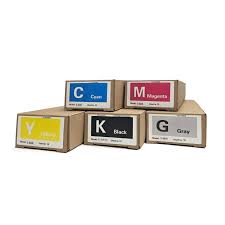
Riso ComColor FT5230 Ink Cartridge Guide: Setup, Compatible Ink & Maintenance Tips
Riso ComColor FT5230 Ink Cartridge: Setup, Compatible Ink & Maintenance
Riso ComColor FT5230 ink cartridge selection made simple — from choosing the right compatible ink to step-by-step installation and long-term printer care.
Request Free Sample →What Is the Riso ComColor FT5230?
The Riso ComColor FT5230 is a high-speed inkjet printer designed for high-volume environments such as schools, print shops, and offices. It delivers up to 150 pages per minute using oil-based pigment ink cartridges — a technology that sets it apart from standard laser or desktop inkjet printers.
Understanding how the FT5230 works with its ink system is the first step to getting reliable, cost-effective results. Unlike toner-based machines, the ComColor FT5230 uses liquid oil-based ink that flows directly from replaceable cartridges into the print head — making cartridge quality a critical factor.
What Ink Cartridge Does the FT5230 Use?
The Riso ComColor FT5230 uses oil-based pigment ink cartridges in four colors: Black (K), Cyan (C), Magenta (M), and Yellow (Y). The official ink model numbers are S8929 (Black), S8930 (Cyan), S8931 (Magenta), and S8932 (Yellow).
Many users face the same question: is compatible ink safe for the FT5230? Understanding the difference between OEM and compatible ink helps you make the right choice. For a deeper look at ink types, colors and formulation differences, see our guide on Riso ink explained: colors, types & differences.
| Type | OEM Ink | Compatible Ink (Chameleon) |
|---|---|---|
| Price per cartridge | High | Lower cost |
| Page yield | Baseline | 23–49% more pages |
| Print head clogging | No | No (≤180nm particle size) |
| Odor | Low | Odorless |
| Eco certification | Yes | EU MOSH & MOAH certified |
| Shelf life | 24 months | 24 months |
How to Set Up Your Riso ComColor FT5230
Getting your FT5230 running correctly from the start prevents most common ink and sensor issues. Follow this workflow:
Position the printer on a stable, level surface
Keep at least 20cm clearance on all sides for ventilation. Avoid direct sunlight and humidity above 80%.
Connect power and turn on
Use the supplied power cable. The machine will run a self-diagnostic cycle on first boot — allow 2–3 minutes to complete.
Install ink cartridges
Open the front ink bay. Insert each cartridge (K/C/M/Y) in the correct slot until it clicks. The machine will prime the ink system automatically.
Load paper and run a test print
Use the recommended paper weight (64–90 gsm). Print a test page from the control panel to verify ink flow and alignment.
How to Replace the FT5230 Ink Cartridge
The FT5230 will alert you with a low-ink warning before the cartridge is completely empty. Replace cartridges promptly to avoid interrupted print jobs.
Open the front door of the printer
The ink cartridge bay is accessible from the front panel. No tools required.
Identify and remove the empty cartridge
Each slot is color-coded and labeled. Pull the empty cartridge straight out. Dispose according to local regulations.
Insert the new cartridge
Remove the protective seal from the new cartridge. Slide it into the correct slot until it clicks firmly into place. For FW series ink compatibility, see the FW5230 ink page.
Close the door and resume printing
The printer will automatically detect the new cartridge and resume. No reset required.
FT5230 Maintenance Tips to Extend Printer Life
The most common maintenance issues with the Riso ComColor FT5230 stem from two causes: poor ink quality and infrequent cleaning. Follow these guidelines to minimize downtime.
Cleaning frequency
| Monthly print volume | Sensor cleaning | Full maintenance check |
|---|---|---|
| Under 10,000 pages | Every 2 months | Every 6 months |
| 10,000–30,000 pages | Monthly | Every 3 months |
| Over 30,000 pages | Every 2 weeks | Monthly |
Ink storage tips
- Store unused cartridges at 5–35°C, away from direct sunlight
- Use within 24 months of manufacture date
- Keep cartridges horizontal to prevent oil separation
- Do not shake cartridges before insertion
Compatible FT5230 Ink Cartridges — Factory Direct
Chameleon compatible ink for the Riso ComColor FT5230 is manufactured using German grinding equipment, achieving a particle size of ≤180nm for consistent flow and zero print head clogging. All products carry EU MOSH & MOAH certification (Certificate No. CANEC23013163201).
Available in multiple languages for global distributors and resellers:
FT5230 Compatible Ink
S8929 / S8930 / S8931 / S8932 · CMYK
FrançaisEncre ComColor FT5230
Cartouche compatible · Livraison directe
EspañolTinta ComColor FT5230
Cartucho compatible · Fábrica directa
RisographF-II Ink
Compatible Risograph F-II series
FT SeriesFT2430 Compatible Ink
Riso ComColor FT2430 cartridge
FT SeriesFT5000 Compatible Ink
Riso ComColor FT5000 cartridge
Need a free sample or factory price list for FT5230 ink?
Request Sample & Price →Conclusion
The Riso ComColor FT5230 is a reliable high-volume printer — and keeping it running smoothly comes down to three things: using certified compatible ink, following the replacement process correctly, and cleaning the sensors regularly. Chameleon factory-direct ink gives you a cost-effective, certified solution with 23–49% more pages than OEM, backed by 28 years of manufacturing experience.
Get Factory Price TodayFrequently Asked Questions
Guide to Easy Ink Cartridge Replacement: A Step-by-Step Breakdown
How to Enter Service Mode on Riso Printers
Related Article